0 0 0 0

NEX-Forms Documentation

Documentation & Tutorials for NEX-Forms version 8.0 and above

Using Math Logic
New Docs are under construction.
Please bare with us while we redevelop the NEX-Forms Math Logic docs for you.

For the time being you can still learn how to use Math Logic by completing the "How to Use Math Logic" interactive tutorial in the NEX-Forms Backend:
Running the "How to Use Math Logic" Interactive Tutorial.
  1. Log into your Wordpress Admin area.
  2. Click on the "NEX-Forms" menu item from the admin sidebar.
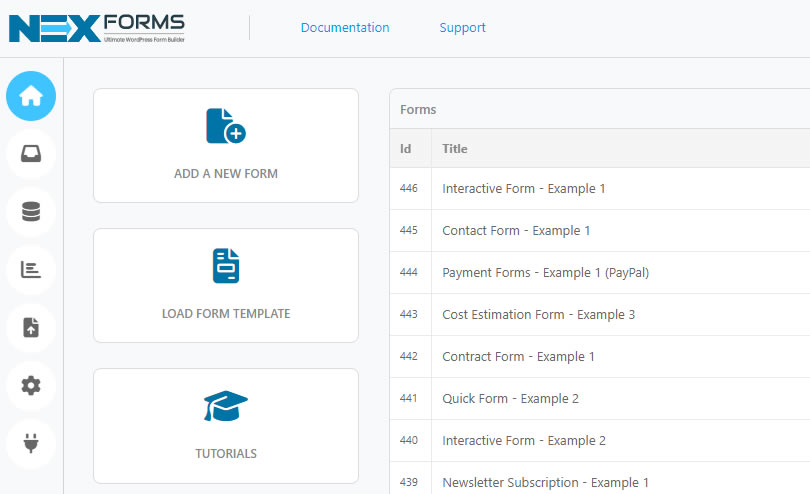
  3. Click on "TUTORIALS"
    NEX-Forms - Figure Arrow
    NEX-Forms - Interactive Tutorial - Figure - 2
  4. Select Tutorial 3 - Using Math Logic
  5. The NEX-Forms form editor now will open and you will now begin the tutorial.
  6. Click on "START"
  7. Follow the instruction and you will automatically advance to the next step in the tutorial.
  8. Keep following each instruction until you have completed the tutorial.
  9. NOTE: If asked to type text, ensure that you type it in the correct case. Tutorials will not advance if your actions do not match the specified instructions.
Previous Docs.
Click here to view the existing documention on Using Math Logic .
Stay in Touch
Get the latest NEX-Forms news and info by following us on:
In this article
bwellsphoto
We have used a few form creation plugins and this is without question at the top of the list. It's also the one I would choose for our most important websites. Well, actually this is going to used on all the sites we develop.
alphateddy
Very unique piece of software, that is oustanding to pretty much all of the other form plugins and gives a fresh and modern touch to your wordpress site.
jack Talarico recently bought a NEX-Forms - BASIC Plan
Marc Trapp recently bought a NEX-Forms - BASIC Plan
CHRISTOPHE MONNOYER recently bought a NEX-Forms - BASIC Plan
Manuel Barzola recently bought a NEX-Forms - BASIC Plan
Mobile pay Sarl recently bought a NEX-Forms - PLUS Plan